Common bugs & fixes
If your error is not listed here then make sure you have followed all the steps explained in this thread.\
Common bugs & fixes
Error Codes and Fixes
If your error is not listed here then make sure you have followed all the steps explained in this thread.
| VGC.SYS | Please uninstall Riot Vanguard. |
|---|---|
| You are trying to inject a cheat while the game is opened. |
| Uninstall Norton antivirus. |
| I2 | l2 code means something blocks cheat injection. |
| l2 -(1073741637) | 1. Go to Settings and open "Security" > "Device Security" |
| This error means FACEIT AC is installed on your PC, please uninstall it. |
| Please install vc_redist.x64.exe: |
| M1 / DEBUG ERROR 2 | It is a common issue on Windows Home versions. |
| LOADER CLOSE AT 100% | Go to Windows settings -> date and time -> Press |
| Please restart your computer and attempt to log in again. |
| COULDN'T FIND A KEY | This error may happen when you try to activate a non-working cheat. |
| DISABLE REAL TIME PROTECTION | Go to "Virus & threat protection" > "Virus & threat protection settings" |
| INFINITE LOADER REQUESTING UPDATES | Open Network and Sharing Center, choose Ethernet > Properties, |
| This error means that the cheat is not updated [status] |
| BLUE SCREEN OF DEATH | Please run the following commands in the command prompt |
Additional Error Codes and Fixes
- For the rest of error codes such as "IJ1, IJ5, IJ8 Follow the "General Instructions" steps above and restart your computer.
- Error IJ7 might be caused by injecting while the game is not open or in fullscreen mode. If you are sure that the game is open and in borderless mode, please try injecting a few times until it succeeds. (for R6 product only).
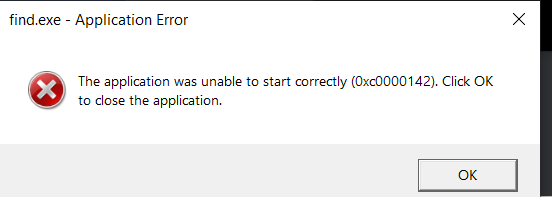 <- The error is caused by Windows Insider being installed, which is not supported. To fix it, please reinstall Windows to the normal version.
- I2 (-1073740285) (or similar error code) is caused by the latest Windows 10/11 update from 09.04.2024.
You need to revert the update and turn off Windows Update to prevent auto-updating in the future.
To uninstall, please select Start > Settings > Windows Update > Update history > Uninstall updates > search for KB5036892, KB5036893 or KB5036892 and uninstall them.
There might be different names for KB updates, so please uninstall all KB updates from April 9, 2024, and April 13, 2024. Make sure Windows Update is disabled.
Was this article helpful?